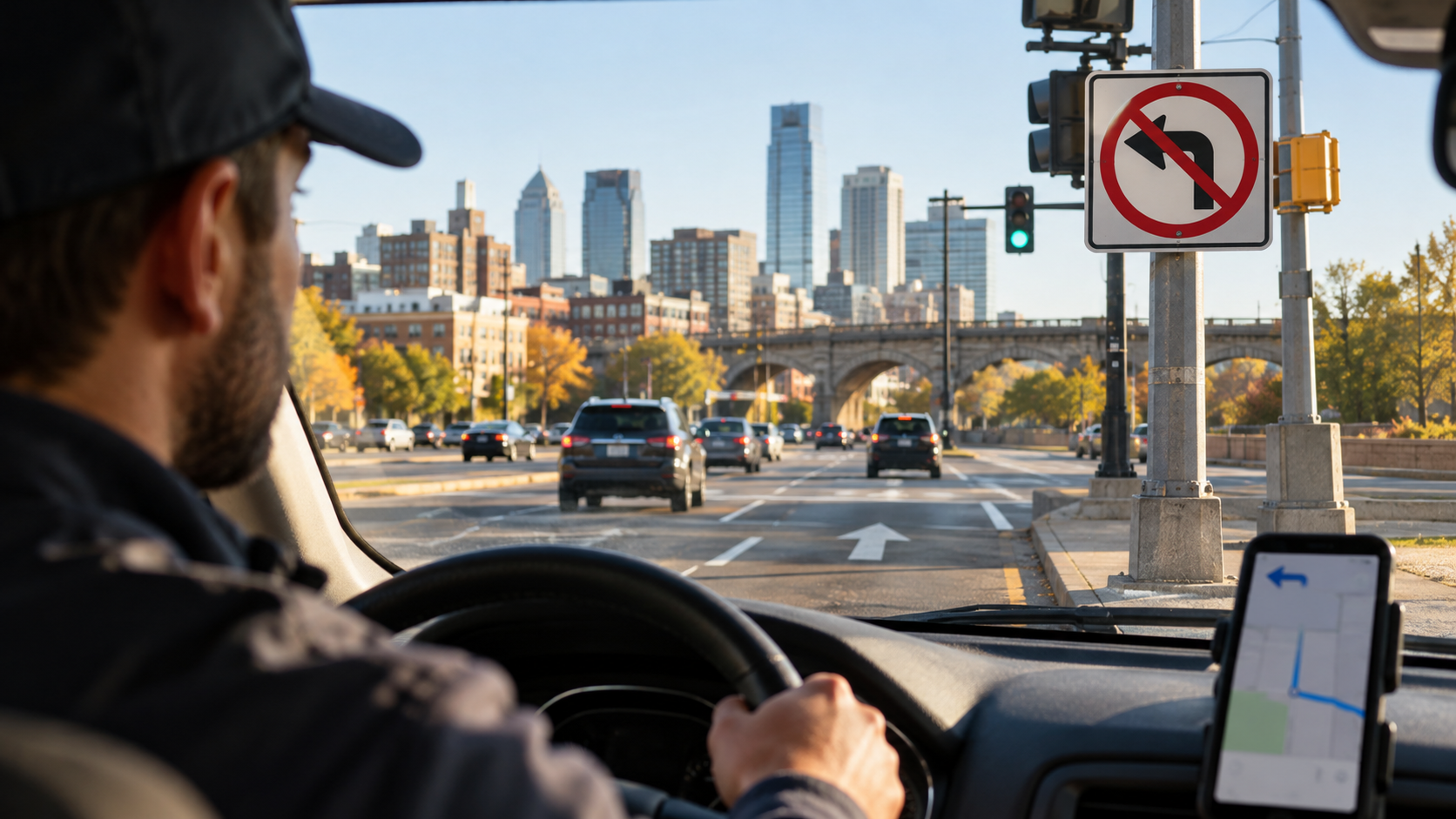
The route app says, “Turn left in 300 feet.” At the intersection, a sign says no left turn during the morning rush, or a lane arrow sends traffic straight. The driver has seconds to recognize the conflict. The app is useful for planning a route, but the intersection is governed by its actual signs, signals, lanes, and any authorized traffic direction. A delivery stop does not make an otherwise restricted turn available.
A Minnesota delivery driver turn restriction route prompt should be handled before the steering decision. Scan for the posted restriction as you approach, check whether it applies to the vehicle and current time, and continue through a lawful movement if the prompted turn is not allowed. Then let navigation recalculate or review the route from a safe stopped location. Do not brake abruptly, cut across lanes, or turn from the wrong lane to preserve the app's ETA.
This guide focuses on recognizing a turn restriction that conflicts with a prompt. It does not cover every temporary closure, general device-use policy, or a complete legal interpretation of all Minnesota traffic signs. Use the actual sign and current conditions. When the sign is unclear, choose a safe lawful continuation and ask for route help after you can stop without obstructing traffic.
Look beyond the map pin as you approach
Start reading the intersection before the app announces the final turn. Identify the street name, lane arrows, overhead signs, curbside signs, signal heads, and whether the approach lane is dedicated to a movement. A sign may be mounted before the corner rather than directly at the stop line. In a larger vehicle, a vehicle-specific sign or turn geometry may also matter. Keep attention on driving; do not hunt through a tiny screen while traffic is moving.
Minnesota Statutes § 169.06 addresses compliance with applicable official traffic-control devices. That is the legal context for treating the posted control as the decision source. The statute has terms and exceptions, including directions by authorized persons. It is not a reason to ignore the actual signal state or a flagger. A driver should follow the control that applies in the moment, not a route instruction cached earlier.
Check whether a restriction is permanent or limited by time, direction, vehicle type, or another condition. A “No Left Turn 7–9 AM” sign is a different instruction at 8:15 AM from one at 11:00 AM, assuming no other restriction applies. Read the whole sign. Do not treat an arrow or exception panel as decorative. If you cannot read it in time to turn safely, continue and find a place to review before another approach.
A map pin may also place the destination on the wrong side of the street or near an entrance that is reached from another road. Confirm the address and entrance separately from the turn decision. The need to reach the customer does not decide how to move through the intersection. A legal approach from the next block may be slower and still be the correct route.
Perform a posted turn restriction check
A posted turn restriction check asks three immediate questions: what movement is prohibited, when does the prohibition apply, and which lane or vehicle does it govern? Read the sign's wording and arrows. A no-left-turn sign does not necessarily prohibit going straight; a no-U-turn sign does not automatically say anything about a normal left turn unless another control does. Do not assume two nearby signs have the same scope.
Look at lane markings as well as roadside signs. A lane with a straight arrow may not be a lawful left-turn lane. An overhead sign may apply to a specific lane. A center turn lane can have its own restrictions. If you are not in the proper lane early enough, continue with the lane's permitted movement and reroute. Forcing a turn across a solid line or from a through lane creates a hazard and may violate the applicable control.
Observe temporary instructions. A construction flagger or police officer may direct traffic differently from a normal sign under the circumstances covered by law. Follow the authorized direction as it is actually given. Do not invent an exception because another vehicle turned, because cones look movable, or because the route app still displays the old path. If the traffic pattern is confusing, reduce speed as appropriate and continue to a safe point for help.
Vehicle type matters when a sign restricts trucks, length, weight, or a turn radius. A delivery driver should know the assigned vehicle and ask the employer about any vehicle-specific route requirements. A sign for a class of vehicles may not apply to every van, and a generic navigation app may not know the vehicle's dimensions. Do not guess from the delivery job title alone. If applicability is uncertain, avoid the questionable turn and ask dispatch for an approved route.
Handle a delivery route navigation conflict without a sudden maneuver
A delivery route navigation conflict is a cue to keep driving under the posted controls, then solve navigation. If a left turn is prohibited, proceed straight or make another lawful movement from the lane you occupy. Do not stop in the intersection to ask the app what to do. Do not turn right solely because it is the first available movement if a sign or lane control also restricts that turn. Read the road.
If you pass the intersection, the app may suggest a U-turn or a loop. Evaluate each new prompt against signs and lane rules as well. A route recalculation can repeat the same bad turn from another approach or propose an inappropriate maneuver for a delivery vehicle. Use a lawful street network and ask dispatch when the app cannot provide one. A missed turn is a routing problem; it does not need to become a traffic violation.
Do not punish yourself by trying to “make up” the lost time with speed. Update the ETA under the employer's process if the detour materially affects a delivery window. A dispatcher can adjust stop order or customer communication when needed. The driver should provide the restriction observed and the current safe route, not a promise that the original ETA will somehow be met.
NIOSH's motor vehicle safety information frames driving for work as a safety concern. For this decision, its relevance is practical: a schedule or device prompt should not push a driver into a sudden maneuver. The source does not supply a turn-by-turn detour for a particular city block.
Prepare for a difficult turn without treating preview as proof
Before departure, a driver may notice that the planned route uses a complex downtown intersection, a narrow street, or a turn near a school. If the employer's routing tool shows a restriction or vehicle warning, flag it early. Ask whether the assigned vehicle is suitable and whether dispatch has a preferred approach. That preparation can reduce surprises, but it cannot replace observing the actual traffic controls when you arrive. Signs, signal phases, and temporary directions may differ from a preview.
If the route crosses a city boundary or a service area you do not know, do not assume the app has current rules for every turn. Keep your vehicle profile accurate if the employer's tool supports one. A van and a longer box truck may receive different approved routes. If the tool is built for a smaller vehicle, tell dispatch before relying on a tight turn. Do not invent a vehicle restriction where none is posted; ask which routing standard the operation uses.
Plan where you can continue if the turn proves unavailable. A driver who knows the next through street has a lawful loop is less likely to force a last-second maneuver. The fallback should be a broad route idea, not an instruction to make an unverified U-turn. At the intersection, follow the current signs and lanes. If the fallback is blocked too, proceed to a safe pause and ask for help.
Handle an obscured or uncertain restriction
A sign may be partly hidden by a truck, snow, vegetation, or construction equipment. If you cannot read the full condition in time, do not guess that the turn is permitted. Continue in a lawful lane and review the intersection from a safe location or on a later approach. The same applies when a time panel is visible but the main restriction is not, or when a lane arrow is worn and another control is unclear.
Do not stop in the intersection to decipher a sign. A driver can report the location and uncertainty to dispatch from a safe place. If the employer has an approved map or traffic-information source, use it to plan an alternate approach, but remember that a second digital source may also be stale. The next physical observation still matters. A sign that is hard to read may also be a maintenance issue the employer can report through the appropriate public channel.
If another driver says “we always turn there,” ask what they observed and when. Their experience may come from a different time window, vehicle, or earlier sign arrangement. A recent, specific observation is more useful than a general habit, but it still does not override the current control. Keep the decision grounded in what applies to your lane and time.
An uncertain restriction can add route time. Record the detour honestly rather than treating it as driver delay with no cause. The practical note is the intersection, the prompt, the sign or lane feature you could not safely verify, and the lawful route you took. That gives dispatch a chance to review the prompt without asking you to reconstruct the event at the end of a long shift.
Use a brief example to test the decision
Imagine a driver approaching a four-way intersection at 8:20 AM. The app says to turn left for a customer two blocks away. A roadside sign says “No Left Turn 7–9 AM,” and the driver is in a through lane. The facts support continuing straight. The driver can use a lawful later turn and approach the destination from another side after checking each new sign. The driver should not drift into a turn lane at the last second or treat the delivery ETA as an exception. This is a hypothetical example, not a claim about a real intersection.
Change one fact: it is now 10:30 AM, the time-limited sign no longer applies, and the driver is in a lane that permits left turns. The turn may be allowed if the signal and other controls permit it. The app did not become more authoritative; the observed conditions changed. A driver who read only “No Left Turn” without the time panel could take an unnecessary detour. Reading the complete sign matters in both directions.
Change another fact: a flagger at the construction site directs traffic straight despite a normal left-turn signal. The driver follows the authorized direction rather than using the time panel to argue for the turn. If the route becomes unclear, continue to a safe location and ask for an updated approach. The example shows why a static map and one sign cannot describe the whole intersection.
The correct response also depends on vehicle fit. A turn that is otherwise legal may be too tight for an assigned box truck under the employer's vehicle route guidance. Tell dispatch the vehicle and constraint. This guide does not set a turning radius; it reminds the driver to use the actual vehicle and approved routing method.
Find a safe place to review the route
After continuing past a restricted turn, pull over only where stopping is lawful and safe for the vehicle. A travel lane, crosswalk, bus stop, or blocked driveway is not a planning desk. If no suitable curb is immediately available, keep driving to a safe location. Use the employer's device policy when reviewing the map or messaging dispatch.
At the safe pause, check the destination address, which side of the block has the entrance, and whether the suggested alternate route contains other restrictions. A route that circles the block may bring you back to the same prohibited turn. Look for a lawful approach rather than repeatedly following the app into the conflict. If the navigation tool allows an alternate waypoint or blocked-turn report under company policy, use it after the vehicle is safely stopped.
Do not create an improvised U-turn across lanes or a private driveway merely to return to the missed corner. Minnesota Statutes § 169.19 covers turning and signaling in the circumstances it specifies. The actual signs and road geometry still control. A legal loop can take a few minutes; an unsafe shortcut can delay the route much longer and put people at risk.
If dispatch gives an alternate street, repeat it back or verify it in the route system before moving. Ask whether it is suitable for the vehicle. A dispatcher may not see a temporary sign you just observed. Tell them the sign's words, time restriction, and direction. That fact helps them avoid sending you back to the same intersection.
Report a repeatable prompt error with useful details
If the route app repeatedly directs drivers through the restricted turn, record the intersection, approach direction, exact sign or lane instruction, time and date observed, vehicle type, and resulting lawful route. Do not take a photo while driving. If the employer wants a photo, capture it only from a lawful safe position and according to its policy. A precise report can help route planners correct the instruction.
Separate a permanent restriction from a temporary one. “No left turn weekdays 7–9 AM” is different from “police directed traffic straight during a one-hour incident.” A stale route note that says simply “left prohibited” may be wrong outside the time window. Likewise, a temporary construction detour should not be written as if it will always exist. Label the observation and source.
If the app's error affected a delivery promise, tell dispatch which stop and why the ETA changed. Use the actual time difference if known, or state an estimate. Do not alter the stop scan time to make the route appear normal. The reroute is an operational fact that can be explained without hiding the restriction.
Ask who owns the route correction. A driver can report what was observed; dispatch or mapping staff may decide how to update route data. A message saying “map wrong” without intersection details may not be enough. The driver can still proceed with the legal alternate route while the shared map issue is investigated.
Keep turn recognition distinct from the delivery stop
Once you reach the correct block, choose a lawful stopping place for the delivery. A legal alternate turn does not guarantee the mapped curb is legal or safe for parking. Check signs, traffic, and the path to the entrance separately. If the address sits on a busy road, a side-street stop may be better, but it must be authorized and workable for the package.
Do not let the earlier detour rush the final approach. The driver may now be late, but another unsafe decision at the curb will not recover the time. If no lawful access is available, record the obstacle and ask dispatch for an approved plan. Route navigation and parking are two separate decisions, even when the same map screen displays them.
Drivers comparing delivery jobs can ask whether route apps account for vehicle restrictions and how drivers report bad prompts. The published delivery job offer review guide helps identify which route expectations need confirmation. The Saint Paul delivery driver Careers hub offers broader role context. Neither page overrides signs at a particular intersection.