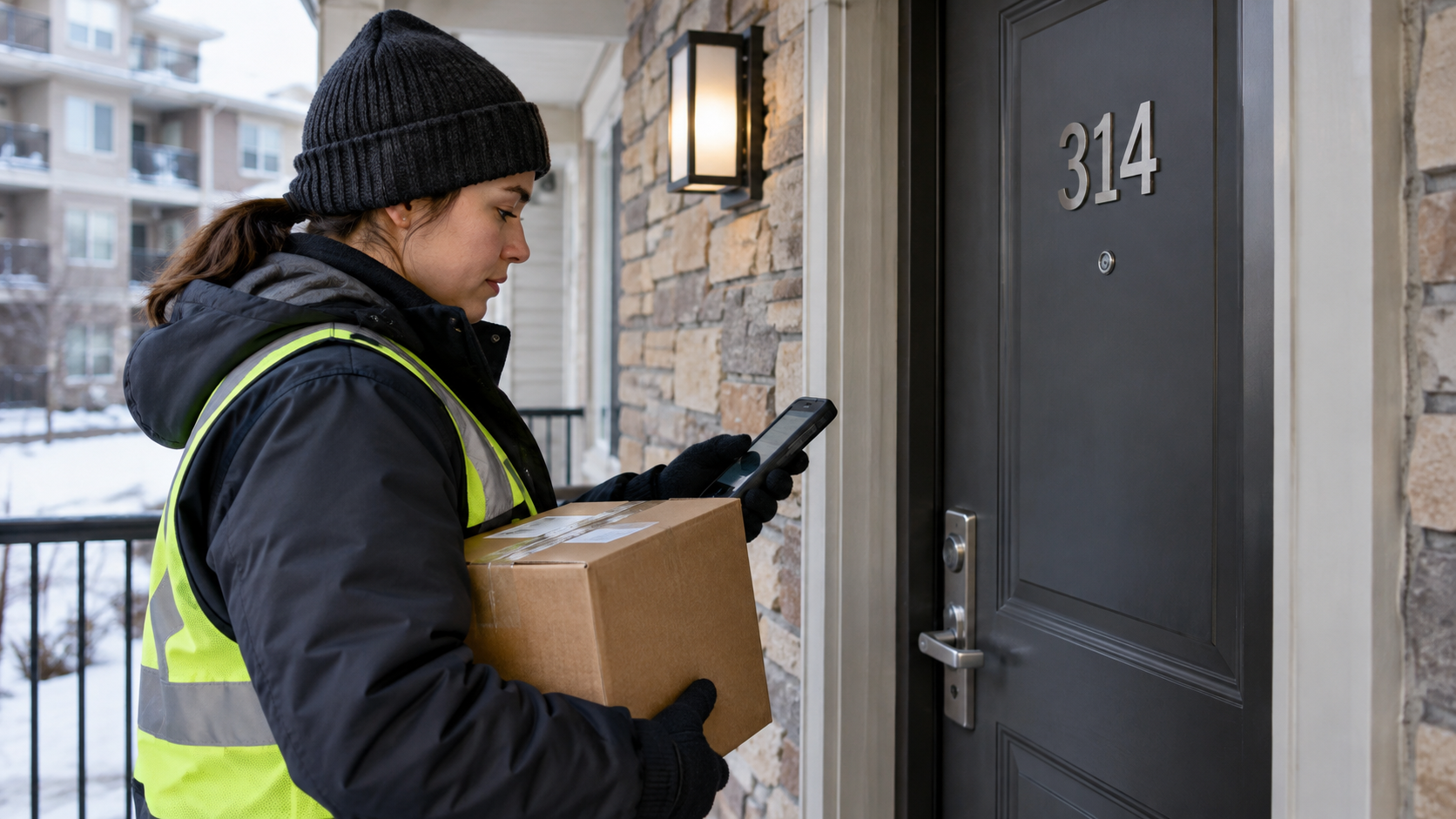
The street address is correct, but the property has several units. The parcel says Apartment 314, the route app shows 341, and the driver is standing outside a door marked 314. A Minnesota delivery driver unit number verification check should happen before the completion scan. Match the parcel label, app stop, building sign, and authorized handoff point. If those disagree, pause and ask for a correction or instruction; do not let the right street number hide the wrong unit.
A unit can be an apartment, suite, room, building, floor, or other secondary identifier. The exact designation matters because two recipients can share one street address. A barcode scan may confirm which parcel the device sees, but it may not prove the driver is at the correct apartment or that the app's destination is current. The physical handoff and digital record should identify the same unit before the driver marks the item delivered.
This guide focuses on the unit check immediately before a completion event. Other articles cover a mismatched recipient name, a device displaying the wrong stop, and how to correct an accidental delivered scan. Those may arise from a unit error, but this article owns the preventive comparison while the parcel remains in the driver's control.
Read the secondary address on the parcel
Start with the label. Read the unit designator and number together: Apt 314, Suite 314, Building 3 Unit 14, or Room 314 may refer to different places. Do not reduce them all to “314.” If a printed line is cut off, look for a second address line or employer-approved parcel detail. Do not guess a missing digit from the nearest door. If the label is damaged or incomplete, use the shipper or dispatch correction process.
USPS Publication 28 § 213 describes secondary address unit designators such as apartment, building, floor, suite, unit, room, and department. That postal standard supports treating the secondary line as part of the address, not optional decoration. It does not tell a driver which current door belongs to a specific tenant. The building signs and authorized contact must confirm the physical location.
Check whether a number is part of a unit or another reference. A shipping label may show an order number, a stop number, and a suite number in nearby print. Do not read the first three-digit number as the suite by habit. Use field labels and placement. If the recipient or sender has included “#314” without a designator, verify whether that number means an apartment, private mailbox, or internal department when the property has several possibilities.
At a multi-tenant property, the recipient name and unit should make sense together. A directory may list a business in Suite 314. If the label says that business in Suite 341, there may be a typo, a move, or a second office. Those are possibilities to investigate, not permission to choose the more familiar number. Preserve what the label actually says while you ask for clarification.
Make a delivery suite number check across records
A delivery suite number check compares the label with the route app and any current delivery instruction. Look at each source separately. The app may display only the street line in its summary while the detail screen contains the suite. A route note may name an older tenant location. A customer message may request a different door. Do not silently combine these into one invented address. Identify which source supplied each unit number.
If the app's unit differs from the label, scan only as far as the employer's verification process allows while keeping the parcel in custody. Ask support which address is authoritative for this shipment and how a correction should be made. Do not edit the unit in a free-text note and then mark the wrong destination delivered. The system needs a parcel-specific resolution that the next reviewer can see.
If the label and app agree, still check the building. An entry panel can show units 300–339 while the next entrance serves 340–379. A door marked 314 is stronger evidence of location than a map pin at the middle of the block, but check that it belongs to the correct building. A complex may repeat unit numbers across buildings. “Building B, Unit 314” and “Building C, Unit 314” are not interchangeable.
USPS's Tracking Basics FAQ says its tracking information may include a delivery location. That illustrates why location detail matters in the eventual record. A tracking location is not a substitute for checking the unit before release, and USPS's fields do not define another employer's app. The driver should follow the actual parcel and device instructions.
Compare the building sign with the intended unit
Read the unit number on the door, mailbox, desk, or directory from a lawful public path. A floor sign may direct Suite 314 to a different elevator bank. Do not assume the unit is on the third floor because its number starts with three; buildings use varied numbering schemes. If the door label is missing, ask a staffed desk or recipient through the employer's approved contact channel. A neighboring door's number may suggest a pattern but does not verify the unlabeled door.
At an apartment building, check the building letter or tower as well as the apartment. If two towers share a lobby, the same apartment number may appear in both. A route note that says “use east tower” may be current or stale; compare it with the directory and sign. If the property has a public parcel room, first determine whether that room is authorized for this shipment. A room location does not make a wrong unit number harmless.
At an office building, a receptionist may accept packages for several suites. Ask which suite the desk will log the parcel under. If the desk says the named tenant moved, do not overwrite the label without a formal address update. If the desk accepts it for the original suite under its current process, record that handoff honestly. The unit check and receiving authority are separate questions, and both must be answered.
If you cannot reach the intended unit because access is blocked, record the access problem rather than inventing a completed unit check. A GPS arrival at the street address does not show that you reached Apartment 314. A delivered scan should wait for an authorized handoff or drop at the correct location.
Resolve a unit mismatch before scan
A unit mismatch before scan can come from a typo, a changed tenant, a device mapping error, or a driver reading the wrong line. The driver usually cannot determine the cause from the doorway alone. Report the exact comparison: “Parcel label Apt 314; app stop Apt 341; building door Apt 314; package still with me.” That gives support a concrete issue without claiming which number is correct.
Do not move the parcel to another unit merely because a resident says the named person moved there. The new unit may be correct, but the employer may require sender authorization or a formal address correction. Ask for that process. If the intended recipient answers and gives a different unit, preserve the message and check whether the shipment allows a destination change. A spoken request should not disappear into an untraceable delivery note.
If the label is correct and the app is wrong, follow the employer's route correction process. The driver may need a supervisor to fix the stop before the scan. If the app cannot be corrected during the shift, ask how to hold the parcel or record an exception. Do not knowingly complete a wrong-unit status because a correct physical handoff seems likely to explain it later. The digital record can misdirect a recipient or a future investigator.
If the app is correct and the label is wrong, the shipment identity still needs careful handling. Do not place a sticker over the label or alter it by hand unless the employer's procedure authorizes that. A parcel can have more than one barcode or an old label. Confirm which identifier the device expects and what the shipper or dispatch says. The right outcome may be a corrected label, a return, or an approved redirect rather than a same-day handoff.
Check each piece at a multi-package stop
Several parcels can share one street address but belong to different units. Sort them by parcel ID and unit before carrying them inside. Do not rely on the route app's stop grouping as proof that every item goes to the same door. A building desk may accept items for multiple tenants, but the log should still attach each package to the right suite or apartment. One broad “delivered to lobby” scan can hide a swapped-unit error.
If a cart holds packages for Apt 314 and Apt 341, keep them visibly separated. At the first door, compare the item label to the door before handing it over. A recipient's willingness to take a parcel is not proof it is theirs. If you realize the wrong item was presented but not released, correct the stack and continue. If it was released, follow the employer's recovery and correction process immediately; do not mark the other item delivered to make totals match.
At a desk, ask for a receipt or log that identifies the unit for each parcel when that is the approved proof method. If the desk refuses one item because the unit does not exist, keep that item and record the specific exception. Do not use another item's receipt as proof. The physical parcel count and scan count should agree at the end of the stop.
If the app offers a “complete all” action, pause before using it. Confirm the units and proof for every included barcode. A fast batch completion is appropriate only when the parcels actually share a permitted handoff and the system can represent their locations accurately. If one item needs a different unit or receiver, split the outcomes through the employer's process.
Handle a missing or ambiguous unit number
Sometimes the parcel has no secondary unit even though the street address serves many apartments or businesses. Do not select a unit from the nearest directory entry merely because the recipient name looks familiar. Check whether the employer's system contains an omitted second line or a verified customer instruction. If the unit is absent everywhere, ask the sender, recipient, or dispatch through the approved process. A building desk may know where a person works, but the desk's suggestion may still need confirmation before the driver changes the shipment destination.
An ambiguous mark deserves the same care. A handwritten “B-14” might be Building B, Unit 14; a printed “814” could be a unit or an internal reference. Compare the full address fields and label format. If the digit is smudged, do not complete a scan at Unit 314 because it resembles 314 more than 814. Preserve a clear image or the original label under policy and request clarification. The driver can explain exactly which character is unreadable, which is more useful than saying only that the address is bad.
If a directory lists the recipient but not the unit, ask whether the directory is current and whether the building has an authorized desk that can accept the parcel without a unit-level handoff. The answer depends on the shipment's release rule. A desk may accept ordinary parcels for the tenant while a restricted shipment requires a named person. The missing unit is not automatically cured by the existence of a front desk.
When the recipient supplies a unit by phone or message, follow the employer's method for confirming and recording a destination correction. Note the source and time of the instruction. Do not type the number into a delivery note while leaving the official stop at an incomplete address if that would produce a misleading completion. If the system cannot be corrected on route, ask whether to hold the parcel, return it, or use an authorized manual process. The final record should show how the unit was established.
For a property with multiple buildings, ask for the building letter and unit together. A recipient may answer “314” when the driver actually needs “Building C, 314.” Repeat the complete destination back before moving the vehicle or handing over the parcel. A small confirmation can prevent a later search through several identical unit numbers.
Use a worked example with one changed digit
Suppose a parcel label reads Building B, Unit 314. The route app shows Building B, Unit 314. The building sign directs units 300–329 to the north entrance, and the door is marked 314. The recipient or an authorized drop at that unit is available under the shipment's rules. The driver can complete the handoff and record the approved proof. The street, building, unit, and physical point all align.
Change the app unit to 341 while leaving the label and door at 314. The driver should stop before final completion, retain the parcel, and ask support which address is authoritative and how to correct the stop. The fact that the label matches the door does not make a wrong app record harmless. If support confirms the correction, the driver can proceed under the updated instruction.
Change the building letter instead: the label and app say Building B, Unit 314, but the driver is at Building C, Unit 314. The unit number alone is a false match. The driver should move to the correct building through an authorized route before any handoff. A photo of the C door would not prove delivery to B.
These examples are hypothetical. The check is not a long investigation on every stop; it is a deliberate comparison of a few fields before release. When the fields agree, the handoff can proceed under the shipment's rules. When they do not, the driver has a precise question for support and a parcel that remains controlled.
Complete the scan only after the unit is resolved
Once the correct unit and authorized receiver or drop point are confirmed, follow the employer's sequence for barcode, location, and proof. Check the final screen if possible. It should identify the intended parcel and stop. If a photo or signature is required, attach it to the right item. Do not complete a delivered event while the unit discrepancy is still open, even if the recipient says they will sort it out inside the building.
If the device displays the wrong stop despite correct parcel and unit information, that is a separate interface problem. Stop and use the employer's support path rather than forcing this unit's delivery into another stop. A later article addresses that device state. If an accidental completion already occurred, preserve the event and request correction through the approved process; do not silently create a second completion.
Drivers comparing delivery roles can ask how employers resolve address and unit discrepancies during a route. The published delivery job-offer review guide helps frame that support question. The Saint Paul delivery driver Careers hub gives broader role context. Neither page verifies the unit on a current parcel.
The final check is simple to state: the parcel label, system stop, building identifier, and actual handoff point must refer to the same unit, or an authorized correction must explain the difference. If the unit cannot be verified, keep the parcel and record the unresolved mismatch. A scan should follow the verified destination, not substitute for it.