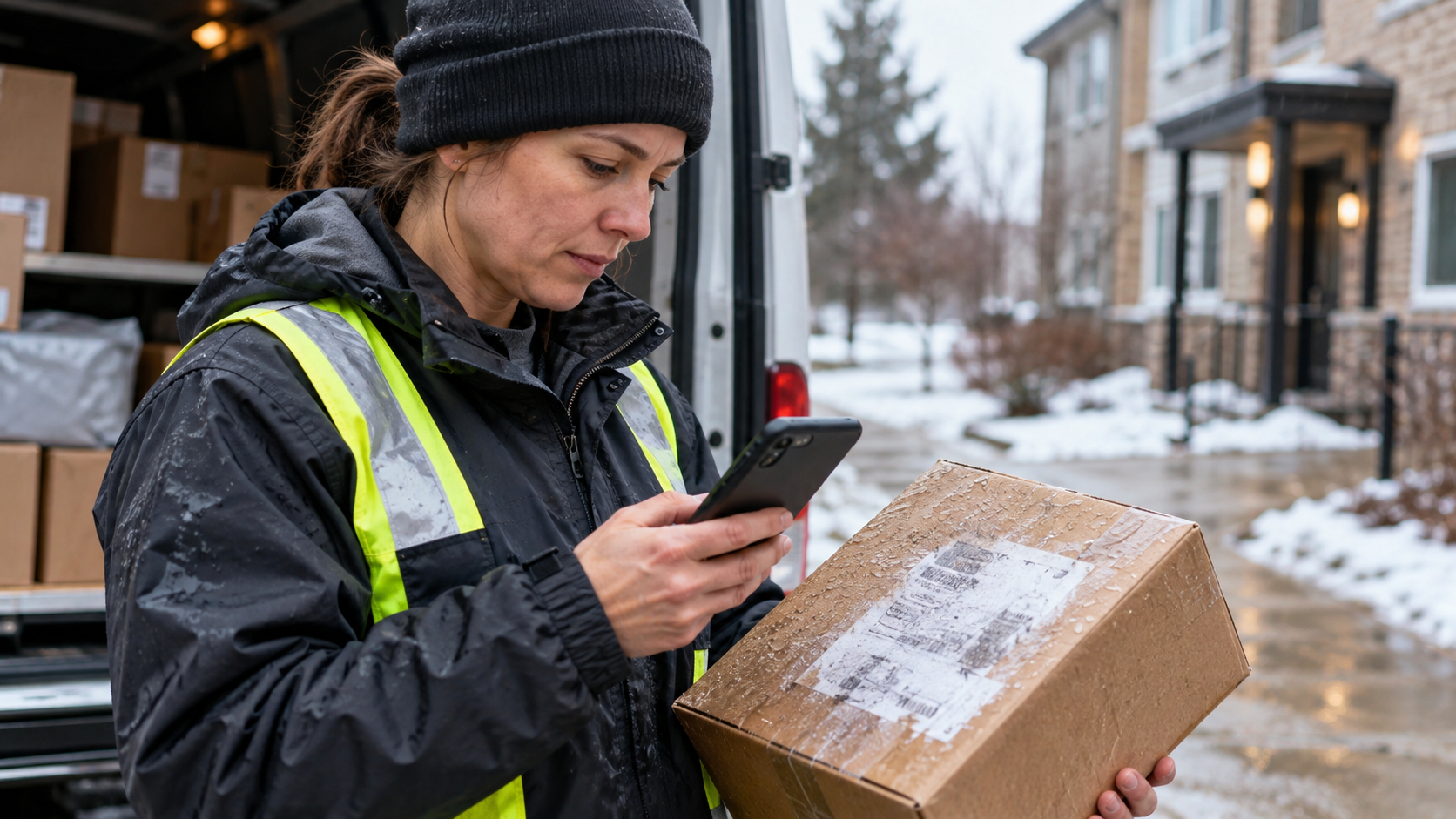
A parcel is in the van, but rain has blurred the suite number on its label. The route app still shows a nearby stop. Is that enough to take the package to the building, or does the driver need an address correction before making an attempt? A Minnesota delivery driver unreadable address case begins by separating what is physically unreadable from what is actually missing or conflicting in the shipment record. The driver should verify the package's identity and destination through approved sources before treating a guessed doorway as a delivery attempt.
An unreadable label is not the same as a wrong address. A printed line may be covered by tape, smudged by moisture, torn away, or legible but incomplete. The app may show a full destination, or it may repeat the same incomplete data. Each version requires a different next action. This guide covers the pre-attempt classification and report. It does not authorize opening a package, inventing a unit from a directory, or rewriting a shipping label on the driver's own judgment.
Public carrier information also distinguishes address conditions. The USPS tracking-status guide lists “Insufficient Address” and “No Such Number” separately from no-access statuses. USPS package-preparation guidance recommends an extra address label inside a parcel in case the outside one is damaged or lost. A driver for another employer cannot assume the same codes or open the parcel to find that inner label. The examples show why the report should identify whether the outside label is unreadable, the address data is incomplete, or the location itself cannot be verified.
Inspect the illegible package label without altering it
An illegible package label may have one damaged field while the tracking number remains readable. Check the barcode, printed address lines, return label, routing sticker, and any employer-applied identifier without peeling tape or removing a label unless the employer's procedure specifically permits it. A scan may recover the shipment ID even when the human-readable street line is blurred. Conversely, a clear street line on a neighboring sticker may belong to a different parcel. Do not choose whichever text is easiest to read.
Note exactly what cannot be read. “Street number visible; apartment digit after 3 unreadable” is a different problem from “entire destination label detached.” If the label has two overlapping addresses, note both without assuming the top one is current. If a reattempt sticker covers part of the original address, check whether the employer's system links that sticker to a revised destination. Preserve the label's condition through an approved photo or report when the workflow calls for it; avoid creating a personal image copy.
The package itself should be protected during this check. Do not soak a label, rub off ink, scrape tape, or unfold a torn piece in a way that makes the barcode unusable. A cautious visual inspection and approved scan are enough to classify the immediate problem. If identity cannot be established, secure the item and ask support how to handle an unidentified parcel. A partial name or retailer logo is not an adequate substitute for a shipment ID.
An item may have a legible barcode but no readable address. That does not automatically make it deliverable. The barcode can be used to retrieve an authorized record, but the driver must still compare that record to the physical parcel and current route assignment. If the app returns no result or a different customer, stop the attempt and report the mismatch. A successful barcode beep only proves the device read a code.
Separate damaged print from missing address data
First ask whether the authoritative shipment record has a complete address. If the label's ink is damaged but the employer's verified item detail shows the street, number, unit, city, and any required delivery instruction, this may be a label-damage problem with a known destination. The employer may allow delivery using the verified record or require a replacement label. Follow that exact rule. Do not make a new label from memory or from a route card whose identity is uncertain.
If the record itself lacks a unit or street number, the problem is incomplete address data. A building directory or a customer's name might suggest a possible unit, but it does not prove which one the sender intended. The driver should use the approved address-verification or customer-contact process. A recipient may have moved, two residents may share a name, or a business may have several suites. Guessing turns an address-data problem into a potential misdelivery.
If the label and app both show full but different addresses for the same barcode, treat the conflict as a separate exception. It may reflect a relabel, reroute, data error, or reused screen state. Preserve the two versions and ask the system owner which destination is current. Do not resolve the difference by choosing the closer stop or the address with easier parking. Physical proximity is not route authority.
The distinctions matter because the eventual correction may be different. Damaged print may call for verified relabeling. Missing destination data may call for sender or recipient clarification. A conflicting destination may call for a route or label reconciliation. None is automatically a “no access” event, and none becomes a completed delivery merely because the van reached the neighborhood.
Run an address verification exception through approved records
An address verification exception should tie the physical parcel to a trusted record. Scan the barcode through the employer's app if permitted, then inspect the item-specific details. Confirm the barcode on screen matches the item in hand; confirm that the route and stop are current; and compare every readable label field with the displayed address. If the system shows a replacement label or corrected address, check its effective status and follow the employer's instructions before proceeding.
Avoid using a general map search as the authority. A map can show where a street number is, but it cannot confirm that a particular barcode is intended for that address. A directory can help find a suite once the suite has been verified; it cannot supply a missing suite from a guess. A customer's social profile, business website, or past delivery note may be stale or belong to someone else. Use them only if the employer's process explicitly authorizes that source for this correction.
If the approved system cannot confirm the destination, contact dispatch or the address-resolution team with the barcode and exact discrepancy. Ask whether the item should remain secured on the vehicle, return to the station, or be transferred for relabeling. Do not carry it through multiple stops without a named owner and a next action. The report should preserve the original printed state so the team can determine whether the source data or only the label was damaged.
When a corrected address is supplied, verify who supplied it and how it entered the authoritative system. A phone call from an unknown person at the stop may be helpful context but may not satisfy the employer's address-change process. A dispatcher may need sender authorization or a specific relabel step. The driver should not promise delivery to a newly supplied location until the approved record and assignment allow it.
Choose the right status before any physical attempt
The route app may pressure the driver to close a stop. Read the employer's exception choices before tapping. An unreadable address or unresolved label is not a failed attempt at a known door if the driver could not establish which door was correct. “No access” usually describes a known location that could not be reached; an unknown destination is a different fact. Use the code defined for label damage, address clarification, or unresolved destination, if available. If the choices are unclear, ask support rather than selecting the nearest-sounding status.
If the driver has already reached a building named in the route app but lacks the unit, say so precisely. Reaching the building does not prove the parcel could be delivered to an authorized person there. A staffed lobby may refuse items without suite details. Record the actual contact and result through policy, then keep custody. Do not leave the parcel at a common desk on the theory that staff can discover the recipient later unless the shipment and site rules authorize that handoff.
If the app lets a driver flag an issue without completing the stop, use that path when it matches the employer's process. Preserve the parcel ID and the current status. A generic “attempted” scan might trigger a customer notice or a new delivery promise, even though no valid address was confirmed. The status should help the next worker understand what information is missing, not hide the uncertainty to make the route total look complete.
An exception can be reopened once the address is verified. The driver may then attempt delivery under the corrected record, or the station may schedule another route. Keep those events in sequence: initial unreadable-address finding, verified correction, physical attempt, and outcome. Do not backdate an attempt to the first time the van passed the street.
Preserve a useful report without spreading address data
A concise report has the shipment ID, route and stop, visible label fields, unreadable portion, app destination, any conflict, and the last action taken. For example: “Barcode ending 4821 scans to Suite 420, but outer label unit is torn off; street and number match. No delivery attempted. Item remains in van pending label instruction.” Replace the example with the actual facts. That report gives support a decision to make without claiming the suite is verified solely from the damaged label.
When a label and app disagree, report both values clearly and identify which source supplied each. “Printed label says 14 Oak; app says 41 Oak” is more useful than “wrong address.” Do not silently edit the app note so one value disappears. A later reviewer needs to know whether the conflict was printing, routing, or a subsequent correction. Keep the original barcode and any correction reference together.
Do not send full addresses or label photos through a personal group chat for crowdsourced guessing. Use the employer's approved channel, which can control access to customer information. If a photo is needed, capture only the relevant label and parcel identity through that channel. Other packages in the van may show unrelated names and addresses. Avoid including those labels in a wide picture.
Ask for an acknowledgement or case reference when the issue cannot be resolved at the stop. The response should say who owns the next action and where the parcel will be held. A vague note saying “bad label” may leave a later driver facing the same ambiguity. The report is complete when it tells the next person what has been verified, what remains unknown, and which process can resolve it.
Follow controlled relabeling or return instructions
The employer may direct the parcel to a station for a replacement label. That is a custody transfer, so record it under the approved return or exception process. Do not write a new address over the damaged label in the vehicle without authority. A hand-written correction may obscure a barcode, create two apparent destinations, or bypass sender approval. If relabeling is permitted at a station, the responsible worker should link the new label to the original shipment identity.
If support confirms the item should be delivered using the app's verified address despite a damaged outer label, follow the employer's rule for that case. The parcel ID and destination must be unambiguous, and any special handling must still be satisfied. A driver should not treat an app address as automatically superior when the physical package carries a conflicting complete address. That requires a reconciliation, not a shortcut.
If the item is to be returned or held, record where it went and who accepted it. “Returned to station” is more useful with a scan or receipt that identifies the parcel. Do not leave it on a general shelf with no handoff record. The same principle applies to a transfer to another driver: a new custodian needs the unresolved address issue and the original label condition, not just the package.
Some parcels carry multiple labels from earlier movements. The employer's process determines which is active. Do not peel old labels simply because one seems obsolete. A prior label may be relevant to the trace, and removing it could destroy evidence of the mismatch. Let the authorized relabeling process identify the current address and preserve the history.
Work through three versions of one smeared unit number
Imagine a parcel with a readable barcode and street address, but the apartment number is smeared. The driver scans the barcode. The approved item detail shows Apartment 312, and the street fields match. Under this hypothetical employer's rules, support confirms that the app detail is the current authoritative destination and permits delivery without a replacement label. The driver then finds Apartment 312 and completes the physical delivery with the required proof. The sequence includes verification before attempt; the smeared label alone did not establish the unit.
Change one fact: the app also lacks the apartment number. A building directory lists three residents with the same surname on different floors. The driver does not choose one. They report the missing unit, keep the parcel secure, and use the approved address-resolution path. A directory can help navigate a verified destination later, but it cannot create the missing destination now.
Change another fact: the app says Apartment 312 but a second readable sticker on the parcel says Apartment 321. The driver preserves both values and asks support which record is current. Even if 312 is the first door off the elevator, convenience cannot settle a destination conflict. A corrected label or authoritative route update may be needed before any attempt.
These versions share the same street and barcode, yet they call for different actions. The first can proceed only after the employer verifies the app address and allows that use. The second lacks essential data. The third has conflicting data. Calling all three “bad address” would hide the information that determines the safe next step.
Check the outcome before releasing the parcel
After support or the station responds, compare the correction with the original item. Does the barcode still match? Is the destination complete and unambiguous? Is the route assignment current? Has the employer told the driver whether to deliver, hold, transfer, or return? A correction that answers only one question may leave the package in limbo. For example, a verified suite number may not authorize a new address if the street also differs.
If the label is repaired, check that the new label remains readable and does not obscure required identifiers. Follow the employer's scan and proof process for the actual delivery. Do not mark the earlier address exception as a completed customer handoff. The corrected item needs its own truthful final event once the physical delivery occurs.
If the address cannot be resolved during the route, close the shift with a named custodian and an open case. The customer-facing status should follow the employer's approved exception, not a guessed delivery attempt. A later worker should be able to see the label condition, the app data, the unresolved field, and the last physical location of the parcel.
For applicants comparing jobs, the published delivery job-offer review guide suggests broader questions about dispatch support. The Saint Paul delivery driver Careers hub gives local role context. During onboarding, ask which screen is authoritative for a damaged label and who can approve relabeling or an address change.
The driver's decision rests on verified item identity and destination. A damaged label can sometimes be resolved from the approved record; missing or conflicting address data needs a controlled correction. Report the exact condition before making an attempt, and the later delivery record can follow the place the parcel was truly authorized to go.