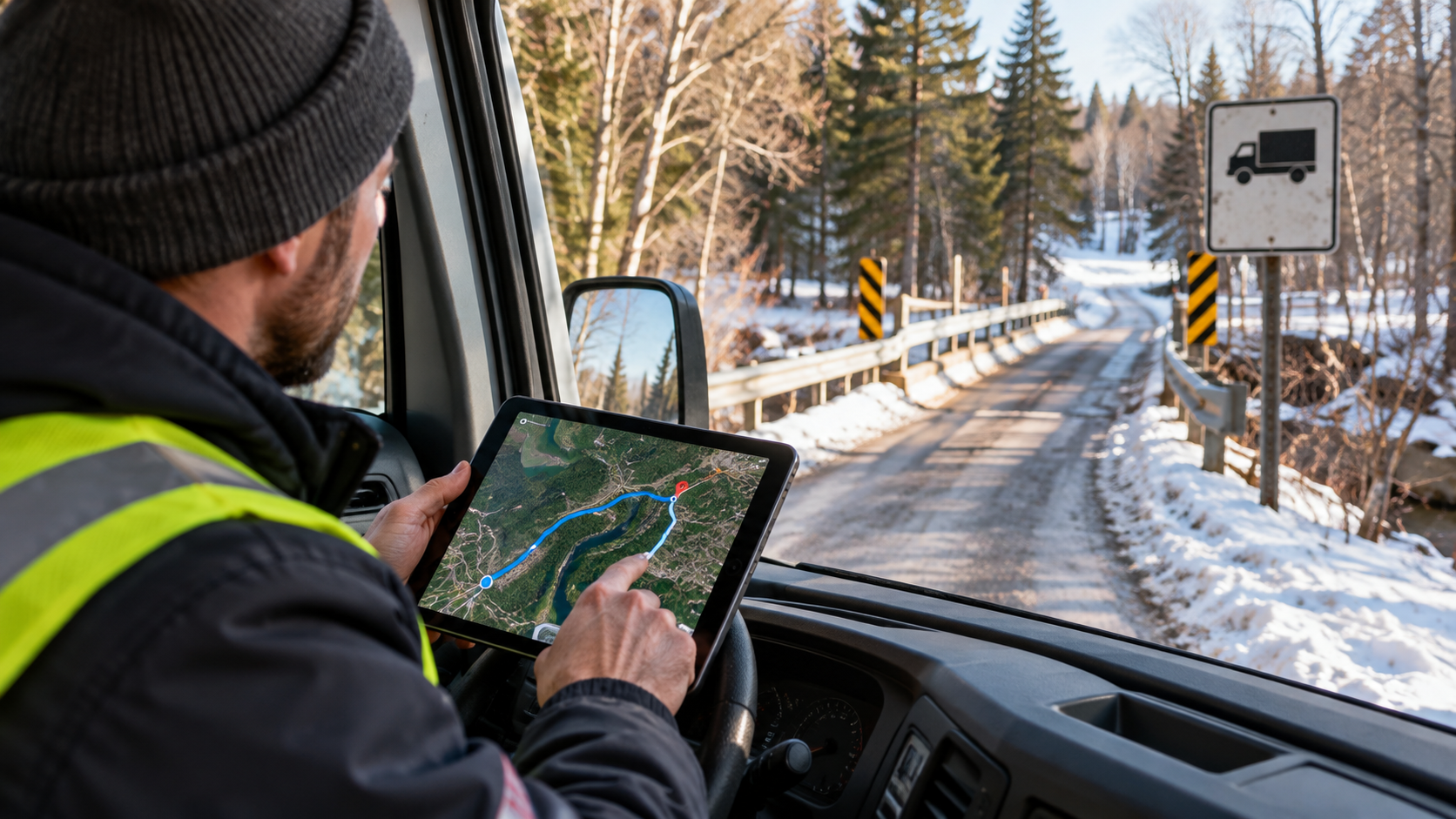
The map shows a shortcut to the next delivery. The road ahead looks narrow, a sign mentions a weight limit, and the assigned van is longer and taller than the vehicle that usually serves this route. The app still draws a blue line through the road. The driver should not treat that line as a vehicle-specific clearance or legal permission. The decision is whether this road fits the actual vehicle and current conditions before entering a place where turning around may be difficult.
A Minnesota delivery van unsuitable road route map conflict can involve a posted restriction, low or narrow passage, weak or seasonal road, private access, sharp turn, poor surface, or an inability to exit. The response starts with observation: read signs, identify the vehicle, and check the road from a lawful position. If suitability cannot be confirmed, continue by a legal route and ask dispatch for an approved alternative. A delivery ETA is not evidence that the shortcut is safe.
This guide focuses on whole-road suitability for an assigned van. It does not replace a specific turn-sign decision, a garage-height check, or the procedure for a fully closed street. Those can be parts of a road assessment, but the core question is whether the route-map segment should be used at all by this vehicle. The employer's vehicle information and current on-site controls matter more than a generic map setting.
Recognize the vehicle-specific route warning
A vehicle-specific route warning may appear on a sign, in the employer's route notes, or in a fleet restriction list. Look for posted height, width, length, axle or weight limits, truck exclusions, seasonal load limits, and private-road conditions. Do not assume a sign applies to every van or to none of them. Identify the exact vehicle and compare the relevant specification with the sign. Ask a fleet lead when the vehicle's loaded weight or classification is unclear.
Minnesota Statutes § 169.81 covers vehicle size and load provisions under its terms. § 169.87 addresses seasonal load restrictions and route designation powers. § 169.06 concerns applicable traffic-control devices. These laws are context for taking posted and vehicle-specific limits seriously; they do not provide a yes-or-no answer from the word “van” alone.
Some concerns are physical rather than posted. A lane may be too narrow for safe passage beside parked cars, a bridge may have a tight approach, or a gravel road may be in poor condition after rain. A map may not show a temporary rut, low branch, construction vehicle, or snowbank. Report what you can actually see. Do not invent a legal restriction where there is none, but do not drive into an evident trap merely because no sign is present.
If a route note says “commercial vehicles use the south approach,” verify that it applies to this stop and vehicle. An old note can refer to a prior closure or another entrance. A useful warning names the segment, direction, vehicle class, and reason. Vague “bad road” comments are harder to act on and easier to misapply.
Run a van road suitability check before entry
A van road suitability check has four parts: legal permission, physical fit, road condition, and a safe exit. Legal permission means current signs and restrictions allow the vehicle. Physical fit means the van can pass, turn, and clear overhead or side obstructions. Road condition means the surface can be used under current weather and employer policy. Safe exit means you can continue through or reach a lawful turning place without backing blindly into traffic.
Start with the vehicle facts. Use the assigned unit's height, width, length, and relevant weight information from the employer's current record. A roof rack or equipment may change the effective height. A loaded route may differ from an empty vehicle in weight. Do not use another driver's estimate or a passenger-car navigation profile as the fleet specification.
Read the road signs before the turn. A posted weight limit may be conditional or seasonal, and a truck restriction can depend on classification. If the wording is unclear, stop safely before entry and ask the employer or appropriate authority for clarification. Do not choose the interpretation that makes the shortest route possible. If the sign clearly excludes the vehicle, use another road.
Look at the road beyond the first few yards. A narrow entrance may open up, but it may also narrow further, end at a private gate, or cross a bridge with a lower limit. The map may show a through street that is now a dead end. If you cannot verify the exit and the road appears unsuitable, do not enter just to “see how far it goes.” The ability to reverse safely should not be assumed.
Keep the current lawful lane while the map recalculates
If the route prompt appears too late to evaluate the road, continue with the lawful movement from your lane. Do not brake in a through lane, cut across a turn lane, or make an abrupt U-turn to satisfy the app. Find a safe place to stop and review alternatives. A map recalculation is a planning tool, not a command to perform the first maneuver it displays.
If the app sends you back to the same unsuitable segment, stop using that suggestion as proof the road is acceptable. Check the destination address and an alternate public route. Tell dispatch the specific road and observed restriction. A dispatcher may be able to use a vehicle routing tool or another entrance. Ask whether the customer has a receiving access that avoids the suspect segment.
Do not read a long map while moving. If a route update requires zooming, comparing signs, or entering a waypoint, park lawfully first under the employer's device policy. The road can change faster than the app's data. Keep attention on current signs and traffic while driving the alternate.
NIOSH's motor vehicle safety information provides general work-driving context. The practical point here is that a schedule should not push a driver into a road they have not verified for the assigned vehicle. The source does not certify a particular detour or local roadway condition.
Compare two alternate approaches in a worked example
Suppose a hypothetical van approaches a local road that the app calls a shortcut. A sign announces a seasonal weight restriction, and the driver does not have a reliable loaded weight for this unit. A state highway route is longer but known to accommodate the assigned vehicle under the employer's route plan. The driver should not guess that “van” means the restriction cannot apply. From a safe stop, ask fleet or dispatch for the weight and applicable route direction. Until then, use the approved alternate.
Change one fact: the sign does not restrict the van, but a low tree branch hangs over the lane after a storm. The legal restriction question is resolved, yet physical suitability is not. The driver should report the obstruction and avoid testing the roof against it. Another legal road or a different vehicle may be needed. A sign's absence does not guarantee clearance.
Change another fact: the road is wide enough and open, but it ends at a private gate before the destination. The map may have an incorrect through connection. Ask whether the delivery entrance is on the other side and how commercial vehicles reach it. Do not enter a private driveway to turn around unless that use is authorized and workable. The map error is about access, not the van's height or weight.
The example shows why one label, “unsuitable,” needs an observed reason. Dispatch can act on a posted limit, low obstruction, or false through-road connection differently. The driver can keep the route record specific without claiming to know the legal status of every road in the area.
Account for weather and temporary road conditions
A road suitable on a dry morning may be poor after heavy rain, snow, or freeze-thaw conditions. Gravel, mud, steep grades, and standing water can affect traction and the ability to turn a loaded van. Observe the actual surface and follow the employer's weather and road-use rules. Do not enter water or a soft shoulder to test whether the route is passable. A map layer rarely captures the condition at the exact delivery time.
Seasonal restrictions can also change when and where a vehicle may travel. The Minnesota statute on seasonal load restrictions is a reason to check current posted limits and employer routing, not to calculate eligibility from weather alone. If a sign or official notice is present, record its wording and location. Ask fleet or dispatch how it applies to the assigned vehicle. Do not assume a summer route is valid during a spring restriction period.
Construction may narrow lanes or alter the road's exit. A cone pattern that admits passenger cars may not allow a wider delivery vehicle to pass without crossing into workers' space. Follow the authorized traffic-control plan and ask for direction if the vehicle cannot fit. Do not move cones, drive on a sidewalk, or follow a smaller car into a gap that is too tight for the van.
If the road looks unsuitable but the reason is uncertain, describe the observation rather than issuing a broad warning. “Deep ruts near the east entrance after rain; no safe exit visible from this approach” is actionable. “Road dangerous” may be true but lacks the details dispatch needs to choose an alternate route or vehicle.
Respond if the warning appears after you have entered
Sometimes the first warning sign or physical problem is beyond the turn. Do not panic or reverse into a busy road. Slow appropriately, watch for an authorized place to stop or turn, and follow current signs and traffic direction. If a low bridge, posted limit, blocked lane, or unstable surface is ahead, stop before the hazard where the vehicle can stand safely. Contact dispatch or an authorized road official when there is no clear legal way out.
Tell the person helping you exactly where the vehicle is, its direction of travel, the hazard ahead, and whether traffic is behind you. “I am on Oak Road 200 yards past Third, facing a posted low bridge; there is no visible public turn before it” is more useful than “stuck.” Use actual observations. Do not claim a turnaround exists because the map displays a driveway; the physical site may not allow the vehicle to use it.
If a spotter or roadside assistance is needed, use the employer's trained procedure. An untrained bystander waving you backward cannot establish clearance or protect every road user. Do not move through a weight-restricted bridge, under a low obstruction, or onto a soft shoulder to escape a queue. The route may be delayed while a safe exit plan is made. Record the actual status so dispatch can manage affected stops.
After the vehicle is clear, preserve the point where the map advice failed. Was the warning sign hidden until after entry? Did the road narrow unexpectedly? Was the vehicle profile wrong? That distinction helps route planners prevent the same situation. A driver who entered before seeing a sign should report that sequence honestly rather than making the note look like the restriction was known at departure.
Distinguish road access from delivery access
The road may be unsuitable for your van while the customer property is reachable from another street. Keep those conclusions separate. Ask about a legal alternate approach, a surface loading area, or a different vehicle. Do not mark the package undeliverable simply because the first mapped road was wrong. Equally, do not assume a footpath from a legal stop is workable for a heavy parcel or a secured item without checking handling requirements.
If the map routes through a private road, verify whether delivery vehicles are allowed and whether the property has a turnaround or exit. A gate code supplied by a customer may open the gate but does not establish that the van fits the road or can leave it. If authorization or physical access is unclear, ask before entry. The employer may have a designated commercial entrance not shown by the public map.
For a multi-stop route, check whether one unsuitable segment affects only this address or cuts off several later stops. A bridge restriction may force a long regional detour; a private driveway issue may affect one delivery. Dispatch can prioritize the response when the driver names the scope. Keep the affected package IDs and route stops in the approved system, not in a personal public map.
Send dispatch a precise route conflict
An effective report includes the road name and segment, direction of approach, the assigned vehicle, the map's suggested movement, the sign or physical concern, and where you stopped safely. Ask for a vehicle-suitable alternate or receiving entrance. For example: “Route app sends van 27 onto Oak Road from the east. Posted weight restriction begins at the turn; loaded vehicle weight is not confirmed. I continued to the public lot on Third and am using the approved main-road approach pending fleet guidance.” The names are hypothetical.
If the alternate adds significant time, give an estimate and identify which stops may miss a window. Dispatch can decide whether to reorder stops or reassign a time-sensitive delivery. Do not silently mark a stop attempted when you have not reached it. Keep the difference between “road not used” and “delivery inaccessible” visible. The destination may still be reachable by another legal route.
Ask who owns a permanent route correction. The driver can supply an observed sign and vehicle facts; a route planner can decide how to update the map or vehicle profile. If the road condition was temporary, label the time and condition. A stale blanket “avoid Oak Road” warning can send future drivers on unnecessary detours after the issue clears.
If a customer offers a shortcut through private property, confirm authorization and vehicle fit through the employer's process. A customer may know their driveway but not the van's turning radius or a restriction on an adjacent road. Do not accept a verbal shortcut as a substitute for posted signs and fleet guidance.
Keep the stop result and future route note accurate
If the alternate works, complete the delivery under the normal proof process and note the route variance if it matters. If no suitable access exists, ask dispatch for a different vehicle, later attempt, or approved handoff. Use the employer's actual exception code. Do not label the customer absent if the driver could not safely bring the assigned van to the site.
When the road problem is repeatable, save a short note: vehicle type, road segment, sign or physical constraint, date, and successful alternate if one was verified. Do not record an untested alternate as approved. A future driver should still read current signs and assess the assigned vehicle. The note helps them start from evidence, not from a generic app line.
Drivers comparing jobs can ask whether navigation uses vehicle dimensions and how road conflicts are escalated. The published delivery job offer review guide can help clarify route and vehicle support before hire. The Saint Paul delivery driver Careers hub offers broader role context. Neither page approves a particular shortcut.
For each proposed alternate, check legal permission, vehicle fit, surface, and exit again. Send dispatch the rejected segment and observed reason so the route record explains any change to stop order or delivery timing.